Export Report? Window
The Export Report? window is used to define the file format to use when exporting a report. This window is also used to select which tabs of the report are exported.

|
To access the Export Report? window, click the |
 (Export Report) icon on various report screens in the XtreamService application.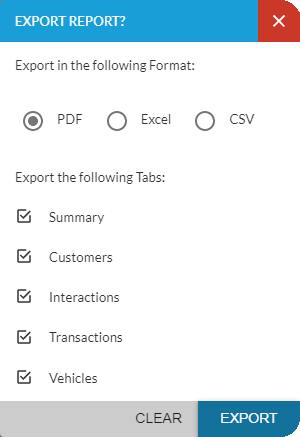
To export the report, select the file format to be used to export the report, select the tabs of the report to export, and then click the EXPORT button. The report is exported to the PC or network drive in the selected format.
Note - Tabs can only be exported for certain reports.
The following items are available on the Export Report? window.
Export in the following Format: Select the file type in which the report should be saved. The following option buttons are available:
PDF: Select this option button to export the report as a .pdf file.
Excel: Select this option button to export the report as a .xlsx file.
CSV: Select this option button to export the report as a .csv file.
Export the following tabs: Select the check boxes corresponding to the tabs to include when exporting the report.
Note - The check boxes available vary based on the report.
Click here for a list of products that may be mentioned in this help file.